S3 Plugin: Architecture
EnterpriseBacula Enterprise Only
This solution is only available for Bacula Enterprise. For subscription inquiries, please reach out to sales@baculasystems.com.
The S3 Plugin uses the standard S3 API, so it is based on HTTP(s) requests invoked from the FD host where the plugin is installed. It is using the REST version of the API through the official AWS Java SDK version 2. For more information about S3 APIs, see:
The plugin will contact the S3 endpoint to be protected during backups in order to get the needed metadata and files. Conversely, the plugin will receive them from an SD and will perform uploads as needed during a restore operation.
The implementation is done through a Java daemon, therefore Java is a requirement in the FD host.
Below is a simplified vision of the architecture of this plugin inside a generic Bacula Enterprise deployment:
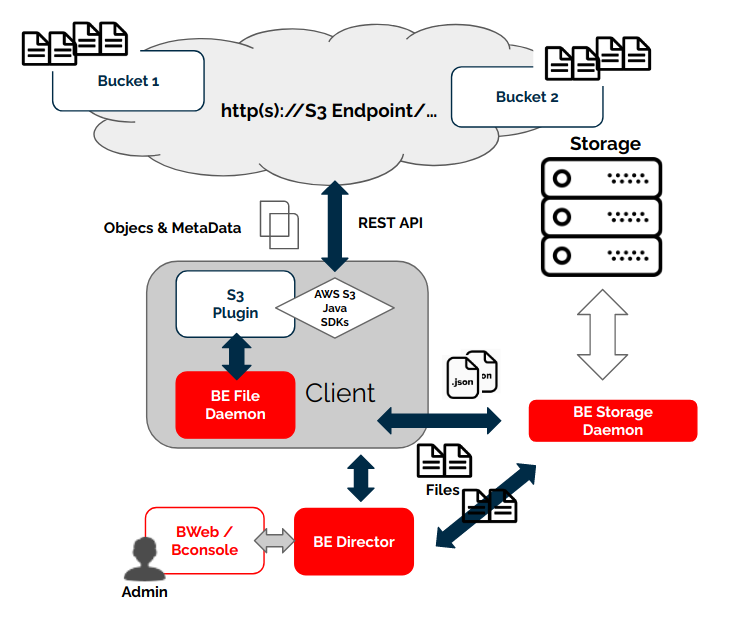
S3 Plugin Architecture
ACLs are stored in JSON format preserving their original values, while files will present the key value of the S3 object as their name in the Bacula catalog.
Catalog Structure
Files will keep their names in the Catalog and will be included in a path like the following one:
/@s3/bucketName/path/to/file/name-file.extension
File Integrity and Checksums
When a file is uploaded to S3, the user can select to use a file integrity check using 4 different algorithms:
The S3 plugin uses this information (it was used during the upload) in order to calculate the checksum of the downloaded data during the backup processes to validate the integrity of every file. In case there are any discrepancies, the plugin will warn about them with an error in the joblog.
When a file is restored to S3 buckets the S3 Plugin will calculate an MD5 checksum and will inform the S3 service to calculate and compare the value once the data is completely uploaded.
Both checks may be disabled in case the target system does not support them or to save some computational resources by activating the fileset variable ‘disable_hashcheck’ (example: disable_hashcheck=true).
Versions History
AWS S3 service can be configured to retain the history for the stored objects (ie: versions or revisions of the same file):
A new version of an object can be created each time the file is saved. Previous versions of an object may be retained for a finite period of time depending on specific settings associated to the bucket. By default, this feature is disabled.
The S3 Plugin is able to backup this information if the special version_history backup parameter is activated.
File versions have some particularities compared to normal files:
They are backed up as a regular file. This means a revision has its own full metadata as the parent file itself has. All the metadata is the same as the file contains, except for size, dates and name.
The name of the file is modified, so at restore time you can see the version number and the version date in the filename. Example:
Parent file: myDoc.doc
Versions:
myDoc###v25.0_2021-01-19_234537.doc
myDoc###v24.0_2021-01-17_212537.doc
myDoc###v23.0_2021-01-12_104537.doc
…
Notice that the extension of the file is kept
Versions are not restored by default. You need to disable the special restore parameter ‘skip_versions’, by setting it to 0.
To see ###v_ files:
For Full backups: the files must already have versions stored in the bucket.
For Incremental/Differential backups: the files must show “more than 1 modification” since the last Full/Incr/Diff.
File versions are backed up in all backup levels (Full, Incremental, Differential), this means you can track all the changes of the files in your backup. For example, every Incremental run is going to backup only the new modified versions since the last backup.
Here is an example of a some files backed up with revisions included, listed in a restore session:
cwd is: /@s3/bucketName/myDir/
$ ls
Contentiones/
Dolores###v_2022-09-12_104436729.doc
Dolores###v_2022-09-12_104444796.doc
Dolores###v_2022-09-12_104448264.doc
Dolores.doc
Legimus###v_2022-09-12_104518541.mp4
Legimus###v_2022-09-12_104527444.mp4
Legimus###v_2022-09-12_104530638.mp4
Legimus.mp4
Netus.ppt
Posse###v_2022-09-12_104456414.docx
Posse###v_2022-09-12_104506748.docx
Posse###v_2022-09-12_104510261.docx
Posse.docx
Ridiculus.jpeg
See also
Previous articles:
Next articles:
Go back to: S3 Plugin.