Security Plugin: Installation
EnterpriseBacula Enterprise Only
This solution is only available for Bacula Enterprise. For subscription inquiries, please reach out to sales@baculasystems.com.
Note
See the List of Bacula Enterprise Plugins for plugin package names and information on where to install each plugin.
Prerequisites
On the File Daemon host server, the Plugin Directory directive of the File
Daemon resource in /opt/bacula/etc/bacula-fd.conf has to point to
where the security-fd.so plugin is installed. The standard directory for
Bacula plugins is /opt/bacula/plugins
FileDaemon {
   Name = bacula-fd
   Plugin Directory = /opt/bacula/plugins
   ...
}
Packages
Packages of the Security Plugin are available for supported platforms. Please contact Bacula Systems Support team to get them.
Download the Security Plugin package to your server where a Bacula File Daemon is installed and then install using the package manager.
Debian/Ubuntu
dpkg -i bacula-enterprise-security-plugin*.deb
The package manager will ensure that your Bacula Enterprise version is compatible with the Security Plugin.
RHEL
rpm -ivh bacula-enterprise-security-plugin*.rpm
The package manager will ensure that your Bacula Enterprise version is compatible with the Security Plugin.
Windows
The Bacula Enterprise Security Plugin is selectable as a component of the File Daemon windows installer.
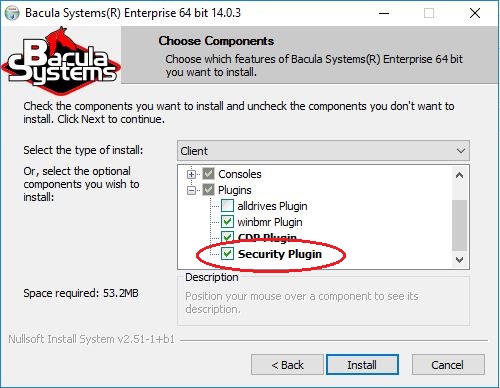
The Security Plugin in the File Daemon windows installer
See also
Previous articles:
Next articles:
Go back to: Security Plugin.