MSSQL VDI: Installation
EnterpriseBacula Enterprise Only
This solution is only available for Bacula Enterprise. For subscription inquiries, please reach out to sales@baculasystems.com.
You must ensure that the mssql-driver.dll is in the Bacula program
directory and the mssql-fd.dll plugin is in the plugins directory on
the FD doing the backup (done by default with the installer), and that
the Plugin Directory directive line is present and enabled in the
FD’s configuration file bacula-fd.conf. An example configuration
file and status output of a client with the MSSQL plugin available is shown
below.
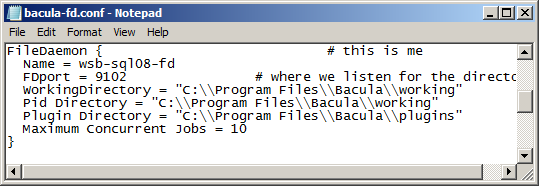
File Daemon Configuration Excerpt with “Plugin Directory” Line
*status client
Automatically selected Client: win2008-fd
Connecting to Client win2008-fd at win2008-64-r2:9102

win-fd Version: 8.4.3 (30 November 2015)  VSS Linux Cross-compile Win64
Daemon started 11-Dec-15 05:13. Jobs: run=1 running=0.
Microsoft Windows Server 2008 R2 Standard Edition (build 7600), 64-bit
 Heap: heap=0 smbytes=348,013 max_bytes=481,620 bufs=134 max_bufs=162
 Sizes: boffset_t=8 size_t=8 debug=0 trace=1 mode=0,2010 bwlimit=0kB/s
 Plugin: alldrives-fd.dll mssql-fd.dll
If the SQL Server database is running under an account that is not
NT AUTHORIZED/SYSTEM, it will be mandatory to configure the SQL
Server instance to allow the Bacula File Daemon service account to
connect and perform backup operations. By default, the Bacula File
Daemon service runs under the NT AUTHORIZED/SYSTEM account.
The permission sysadmin can be granted with the following SQL
command:
ALTER SERVER ROLE [sysadmin] ADD MEMBER [NT AUTHORITY\SYSTEM]
See also
Previous articles:
Next articles:
Go back to: MSSQL VDI Plugin.