Point In Time Restore
EnterpriseBacula Enterprise Only
This solution is only available for Bacula Enterprise. For subscription inquiries, please reach out to sales@baculasystems.com.
This topic is relevant only for SQL Server databases that use the full or bulk-logged recovery models. Under the bulk-logged recovery model, if a log backup contains bulk-logged changes, point-in-time recovery is not possible to a point within that backup. The database must be recovered to the end of the MSSQL backup.
More information can be found on https://msdn.microsoft.com/en-us/library/ms179451.aspx
Point In Time Restore (PITR) requires the database to be configured with the full recovery model. If the database uses the simple recovery model, the MSSQL file will be truncated after each checkpoint. For more information, see https://msdn.microsoft.com/en-us/library/ms189275.aspx.
It is possible to do Point In Time Restore of a MSSQL database directly from the MSSQL Plugin. It is also possible to restore files locally and do the operation from the Microsoft SQL Server Management Console to have more options.
LSN Information
LSNs are used internally during a restore sequence to track the point in time to which data has been restored. When a backup is restored, the data is restored to the LSN corresponding to the point in time at which the backup was taken. More information can be found on https://msdn.microsoft.com/en-us/library/ms190925.aspx.
The LSN of a log record at which a given backup and restore event occurred is viewable using one or more of the following:
Bacula Backup job output
Log file names
msdb.backupset table
msdb.backupfile table
During a backup job with MSSQL Plugin, the following information about LSN numbers will be displayed in the Job output:
win-fd JobId 3: LSN for "db29187": First: 42000146037, Last: 44000172001
The First LSN number corresponds to the last LSN of the last transaction logs backup. It can be the very first Full backup, or the last transactional backup (Incremental). The Last LSN number corresponds to the last transaction recorded in the log.
With a MSSQL backup (Incremental), the file name associated with this database in the Incremental job will be:
/@mssql/MSSQLSERVER/db29187/log-42000162001.trn
The number in the name, here 42000162001 corresponds to the last LSN of the previous job (Full or Incremental).
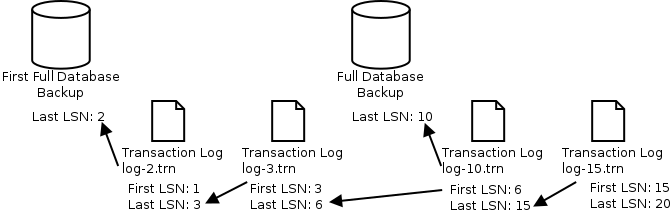
First, Last and Filename LSNs
In the example shown above, if the administrator needs to restore the database at the state that corresponds to LSN 14, it can be done with the following actions:
Use restore menu option 5
Browse the database directory “/@mssql/db29187”
Select last Full backup file “data.bak” (LSN: 10)
Select incremental backup “log-10.trn”
Specify the stop_at_mark option to “LSN:14”
Run the restore job
or if the last full backup is not available but the previous full backup is.
Use restore menu option 3, select the relevant jobids
Browse the database directory “/@mssql/db29187”
Select Full backup file “data.bak” (LSN: 2)
Select incremental backups “log-2.trn”, “log-3.trn”, “log-10.trn”
Specify the stop_at_mark option to “LSN:14”
Run the restore job
Go back to: Restore.