RHV Plugin: Architecture
EnterpriseBacula Enterprise Only
This solution is only available for Bacula Enterprise. For subscription inquiries, please reach out to sales@baculasystems.com.
The following chapter describes the architecture of the RHV Plugin.
The Red Hat Virtualization Plugin is a File Daemon plugin.
It may be installed on a machine inside or outside of your RHV environment.
It is based on a Java SDK, therefore is non-machine dependent and is compatible with any Operating System where the Bacula File Daemon can run and the Java Virtual Machine is available.
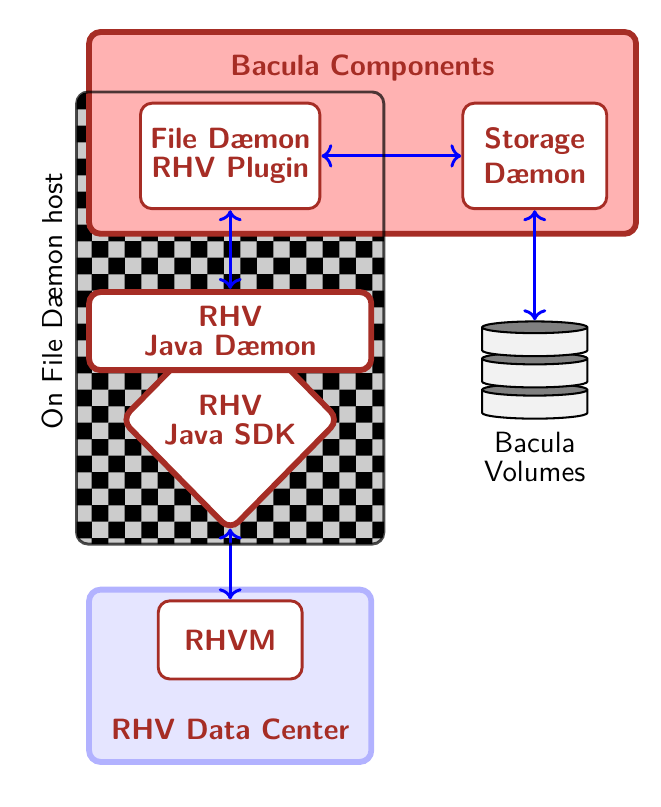
Plugin Architecture
Red Hat Virtualization Technology
Red Hat Virtualization (RHV) is a full virtualization platform capable of managing the full set of features that make up a virtualized data center: Hosts, networks, local, remote, or distributed storage. Management, accounting and monitoring are done through an API-based Web interface, which implements users and roles to implement access restrictions.
RHV is based on the open source OVirt virtualization platform. OVirt is available for Linux distributions related to RHEL. OVirt is under active development, and RHEL integrates releases they consider mature. Therefore, Ovirt itself can typically exist in newer versions than what is part of RHV.
RHV is composed of the following elements:
- RHV Manager
is the service offering management through a web interface and APIs.
- Virtualization Hosts
- are the hypervisors providing their resources to the virtual machines. They are managed through the RHV Manager, and are based on the KVM system.Two kinds of hosts are available:
- RHEL hypervisors
being standard RHEL server systems
- oVirt nodes
are minimal servers which are distributed as ISO images to install a lean virtualization platform solely for RHV usage.
There are 2 ways to deploy the RHV Manager: Standalone, with the RHV Manager running on a host outside of the virtualized environment, which does not provide native high availability, but is easily deployed and managed, and self-hosted, where RHV Manager runs inside the virtualized environment, in a dedicated VM.
The latter approach can be a highly available service by making use of
the ovirt-ha-agent and virt-ha-broker services.
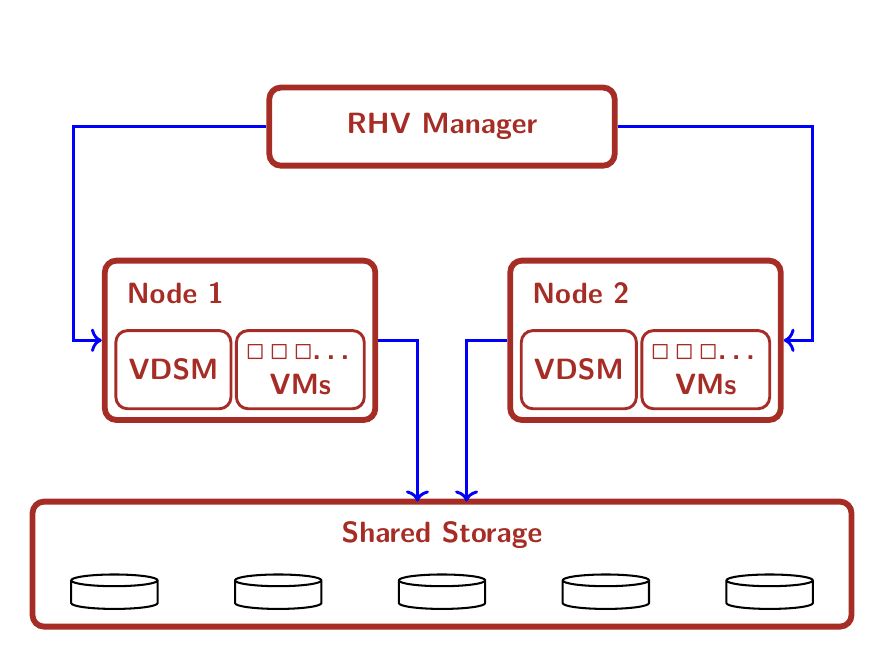
General Architecture (Standalone mode)
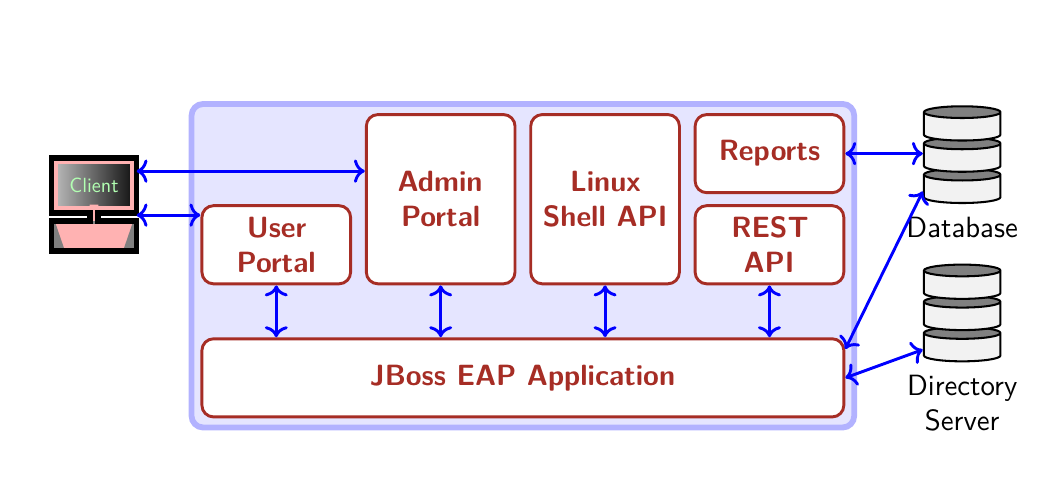
RHV Manager Architecture
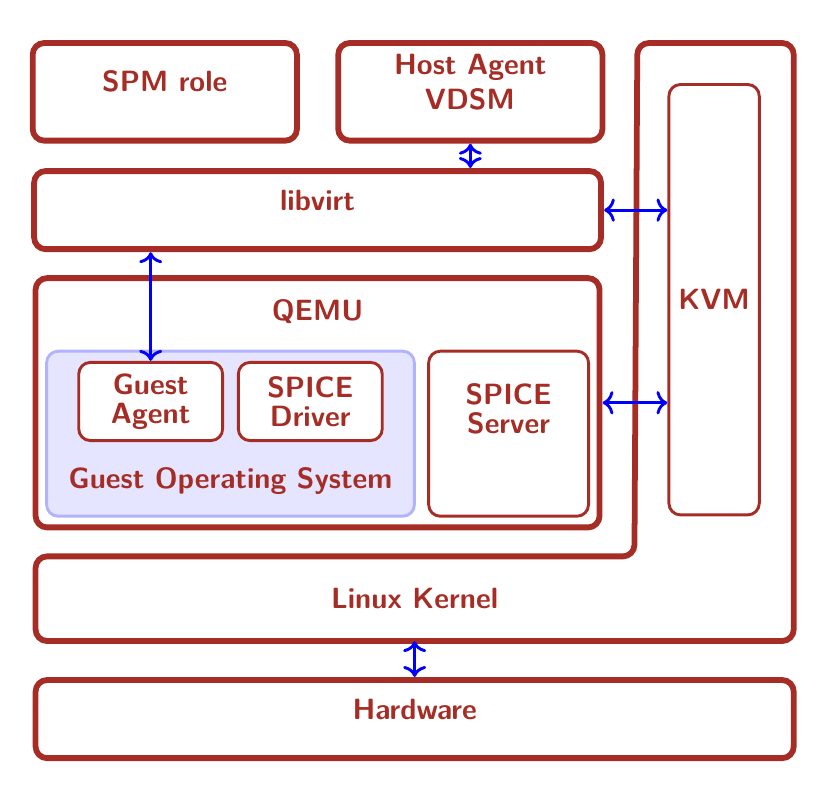
RHV Host Architecture
In figure RHV Host Architecture, the architecture of a virtualization host is shown. The stack of technologies employed by a host to provide a VM consists of the following elements:
- VDSM
is the host agent service running on every virtualization host to provide the hypervisor service to the RHV system. This services listens on the TCP port 54321 on the network.
- libvirt
is the toolkit that manages virtual machines.
- QEMU
is the multi-platform emulator which provides emulation of full systems, including CPU capabilities not available on the underlying system.
- KVM
is the kernel module which provides the system integration component to QEMU. It allows to execute guest VMs in user space, ensuring full segregation of VMs from each other and the host system.
- SPICE
is the interface between virtualized user-facing components and remote interfaces, providing input, display, and sound services to remote interfaces (the “viewer” program).
Other important concepts to understand a RHV system are
- Datacenter
is the most high-level group of virtualization systems, the VMs managed in it, and all the resources available.
- Cluster
refers to a group of virtualization hosts (sharing networks, storage, and some other infrastructure properties). A Cluster is always part of a distinct Datacenter, and a Datacenter can consist of more than one Cluster.
- Storage Domain
indicates a logical entity providing storage capacity to Virtual Machines of a Datacenter.
- Storage Pool Manager
is the role of a certain host in the datacenter which creates, manages, and removes virtual disk images.
- Template
is the base configuration of vms. This configuration can be from the architecture of the processor that will use the vm to the disks attached to it.
- Host
is a physical server on which the virtual machines run. Alternatively, host is also called hypervisor. Both RHEL Virtualization Hypervisors and RHEL hosts interact with the rest of the virtualized environment in the same way.
Template
The templates have the ability to create virtual machines quickly and conveniently. To create a template we need a vm to copy its configuration, its networks and content of its disks.
The templates have a specific configuration and unique content on the disks. Once the template is created the content of the disks is immutable and RHV does not allow to add or remove disks. However, it is possible to modify, add or modify the networks attached to the template.
Storage Domain
Storage Domains are distinct storage subsystems used to host different kinds of information.
Two Storage Domains are used by RHV:
- The Data Domain
stores virtual hard disks of VMs and templates in a Data Center. Data Domains are exclusive to one Data Center.
Data Domains can be backed by different storage attachment technologies, such as NFS, Fibre Channel, FCoE, GlusterFS, Ceph, iSCSI, and any (local) POSIX-compliant file system.
- The ISO Domain
hosts images of media such as CDs and DVDs to deploy software on VMs. There can only be one ISO Domain in a Data Center, an ISO Domain can be shared among Data Centers, and NFS is the only available backing store for this type of storage domain.
Data Warehouse
RHV employs a database of historical data where all the management and
auditing data is stored. This function is provided by the
ovirt_engine_history service. It makes use of the PostgreSQL
database for storing its data.
Networking
RHV allows the definition of different logical networks to isolate traffic types and paths. These networks are created, maintained, and destroyed by the RHV Manager, which also handles VLANs, routing, and firewalling.
Usually, there will be several networks in use in a RHV Datacenter. Some pre-defined network types are available to segregate different types of traffic: A management network which should be used exclusively by RHV management communications, VM networks for use by the virtual machines, storage networks for example for iSCSI or NFS traffic, and storage migration networks.
Networks for dedicated purposes can be created as needed, and they can be bound to specific network hardware (and VLANs) available on the virtualization hosts.
Red Hat Virtualization APIs
RHV provides different APIs to access its functionality:
SDKs (based on the REST API)
The Bacula Enterprise Red Hat Virtualization Plugin is based on the Java SDK 4.3
Connection Modes
RHV allows 2 different authentication schemes:
OAuth Authentication
- HTTP Basic Authentication
The plugin supports both connection and authentication modes.
More information
The information of this chapter is based upon the official RHEL Documentation available in the following links:
General Documentation: redhat.com/…/red-hat-virtualization/
Version Information: redhat.com/…/updates/rhev
oVirt: https://ovirt.org/
See also
Previous articles:
Next articles:
Go back to: RHV Plugin.