Querying RHV
EnterpriseBacula Enterprise Only
This solution is only available for Bacula Enterprise. For subscription inquiries, please reach out to sales@baculasystems.com.
Assuming the Java environment is properly configured, the general approach is as follows:
java -jar /opt/bacula/lib/bacula-rhv-plugin.jar --server=<RHVM-DNS> \
--truststore_file=<path-to-truststore> --truststore_password=<password> \
--auth=<auth> --profile=<profile> \
--user=<user-name> --password=<password> \
--operation=list --path=<RHVM structure>
Results will be returned in JSON format.
The required options indicated above are directly representing the plugin options as described in table pluginoptions.
The following list shows all the available RHVM structure, by default “/vms”:
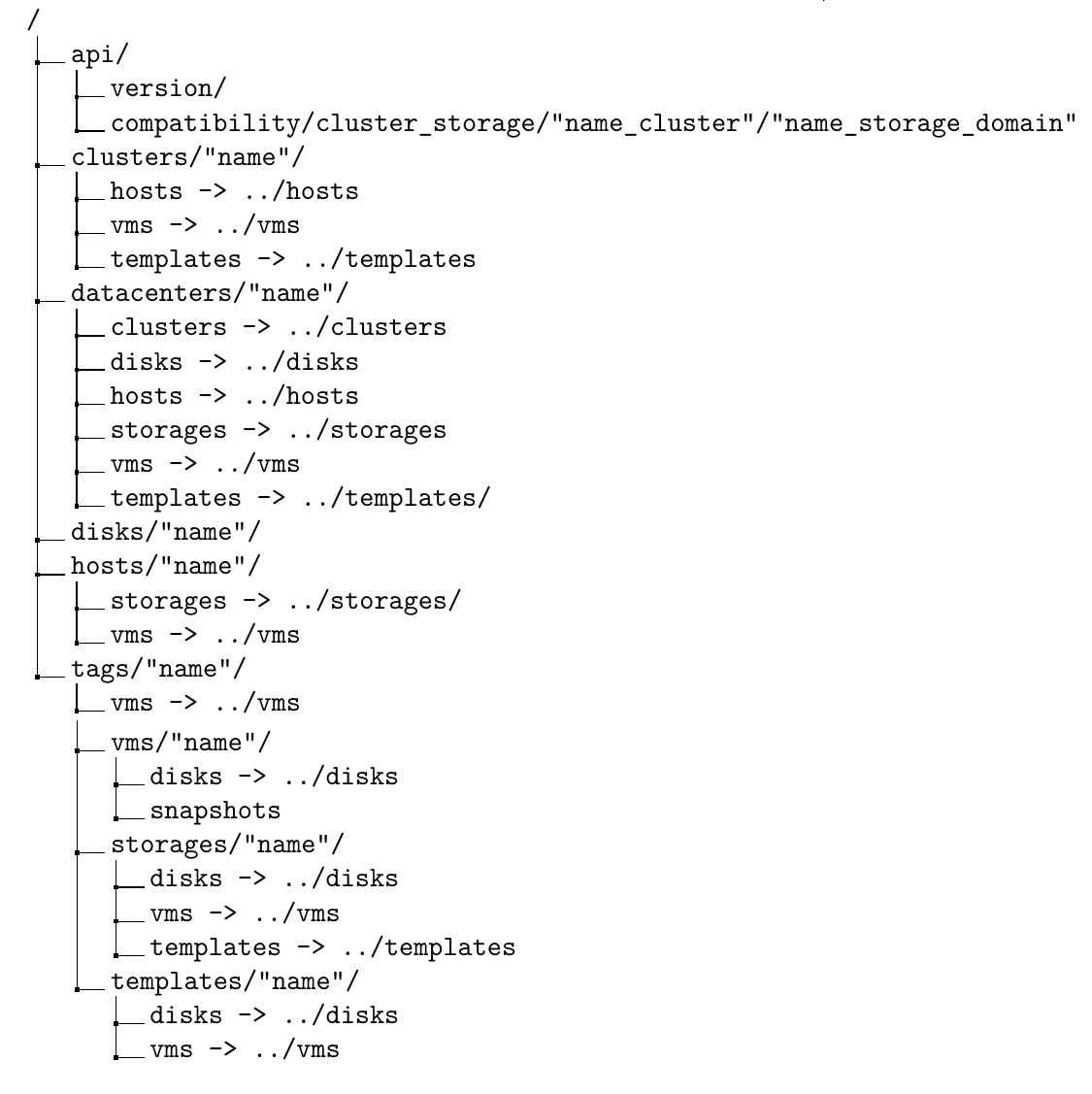
It is also possible to list RHV information using using the
.ls-command of bconsole. Below, some examples are provided.
The meaning of the required and optional parameters are the same as shown in table pluginoptions and above for the query functionality.
Note also that bconsole commands need to be entered without any line
breaks.
Verifying compatible backups of VMs than they starts with vm1*:
*.ls client=RHV-fd plugin="rhv:server=myrhv.com \
insecure=true password=rhvPass123" path=/vms/vm1*

#Answer:
# -rw-r----- 0 root root 0 1970-01-01 01:00:00 4f5f9abd-f407-4da6-ba39-272aed709c80->vm1\
                        [vm] [BACKUP_CLONE,BACKUP_SNAP]
# -rw-r----- 0 root root 0 1970-01-01 01:00:00 a8bf6b18-a116-4067-b884-172777fec446->vm11\
                        [vm] [BACKUP_SNAP]
Listing all disks attached to “vm1”:
.ls client=RHV-fd plugin="rhv:server=myrhv.com \
insecure=true user=bacula password=alsogood" path=/vms/vm1/disks/

# Answer:
#-rw-r----- 0 root root 0 1970-01-01 01:00:00 c43a1865-13ba-483e-b38b-6b929d6b4653->\
                        Preassigned_Disk1 [disk]
#-rw-r----- 0 root root 1 1970-01-01 01:00:00 b0b349ea-72d3-405f-9429-c1cb009f30ce->\
                        Preassigned_Disk2 [disk]
#-rw-r----- 0 root root 2 1970-01-01 01:00:00 3f993fb1-3157-4916-aad1-2f323a3cdd4f->\
                        Preassigned_Disk3 [disk]
#-rw-r----- 0 root root 3 1970-01-01 01:00:00 e9ac9bd8-920f-4eb8-b4d0-b405d675b16f->\
                        Preassigned_Disk4 [disk]
To list all datacenters:
.ls client=RHV-fd plugin="rhv:server=RHV.example.com \
insecure=true user=bacula password=alsogood" path=/datacenters/

# Answers:
# -rw-r----- 0 root root 0 1970-01-01 01:00:00 3e54cf31-7a9a-46ad-8a8d-7843b6d7a145->\
                        dcTest [datacenter]
# -rw-r----- 0 root root 1 1970-01-01 01:00:00 4cdcc978-73af-11e8-835d-b827eb7e5e47->\
                        Default [datacenter]
To list all options in datacenter named “dcTest”:
.ls client=RHV-fd plugin="rhv:server=RHV.example.com \
insecure=true user=bacula password=alsogood" path=/datacenters/dcTest/

# Answer:
# -rw-r----- 0 root root 0 1970-01-01 01:00:00 clusters
# -rw-r----- 0 root root 1 1970-01-01 01:00:00 disks
# -rw-r----- 0 root root 2 1970-01-01 01:00:00 hosts
# -rw-r----- 0 root root 3 1970-01-01 01:00:00 storages
# -rw-r----- 0 root root 4 1970-01-01 01:00:00 templates
# -rw-r----- 0 root root 5 1970-01-01 01:00:00 vms
Check if the Cluster “clusterTest” is compatible with the Storage Domain “iSCSIStorage”
.ls client=RHV-fd plugin="rhv:server=RHV.example.com \
user=bacula password=alsogood" insecure=true \
path=/api/compatibility/clone_storage/clusterTest[Name_cluster]/iSCSIStorage[Name_storage]
# Answer:
# -rw-r----- 0 root root 0 1970-01-01 01:00:00 true
Get version of RHVM:
.ls client=RHV-fd plugin="rhv:server=RHV.example.com \
user=bacula password=alsogood insecure=true" path=/api/version
# Answer:
# -rw-r----- 0 root root 0 1970-01-01 01:00:00 4.2.0
Go back to: RHV Plugin: Operations.