Architecture and Requirements
EnterpriseBacula Enterprise Only
This solution is only available for Bacula Enterprise. For subscription inquiries, please reach out to sales@baculasystems.com.
Architecture
To provide OIDC integration, BWeb leverages the open-source project OAuth2-Proxy. OAuth2-Proxy is deployed in front of BWeb, handles the OAuth2/OIDC flow, and forwards requests to BWeb only after the user is authenticated and authorized.
In practical terms, OAuth2-Proxy acts as the security gate for BWeb web traffic. If token validation, session cookies, or IdP communication fails, the request is blocked before reaching the BWeb application process.
More details and advanced parameters can be found on the OAuth2-Proxy project site: https://oauth2-proxy.github.io/oauth2-proxy/
The request flow involving an identity provider is illustrated in the following diagram:
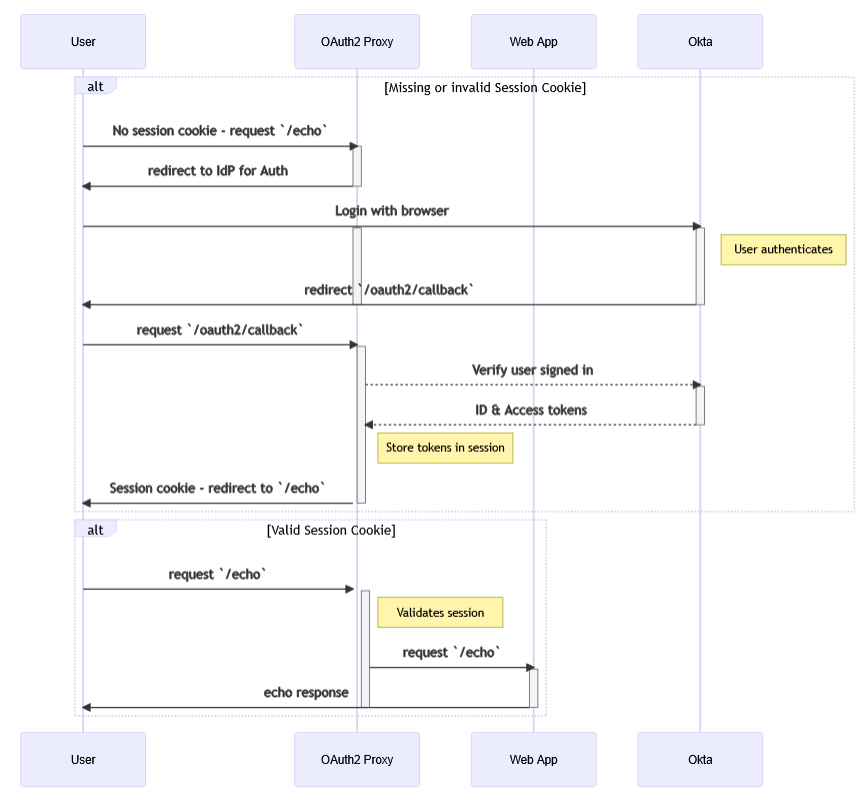
By default, installation scripts deploy BWeb internally at 127.0.0.1:9180, while OAuth2-Proxy
is exposed on 0.0.0.0:443. These settings can be adjusted after deployment in the associated
service configuration files.
This default split is important:
BWeb itself is not directly exposed to end users.
TLS termination and external authentication happen at OAuth2-Proxy.
Access logs and authentication logs are easier to separate during troubleshooting.
Example Connection Flow
When a user logs in to BWeb through an IdP, the sequence is:
BWeb redirects the user to the provider’s authorization endpoint.
The user authenticates at the IdP.
The IdP redirects the user back to BWeb with an authorization code.
BWeb (via OAuth2-Proxy) exchanges the code for tokens.
The access token is used to authorize access to BWeb resources.
For full details, see the OAuth 2.0 specification (RFC 6749).
Scope
This module is designed to support any OIDC/OAuth 2.0 provider. It has been validated with Okta, Microsoft Entra ID, and Keycloak.
The integration is intended to work on any supported Linux distribution. Validation has been performed on Ubuntu and AlmaLinux.
Requirements
Before proceeding with installation, you need a functional IdP configuration that BWeb can access over the network. At a minimum, a user with sufficient privileges must:
Create an application in the IdP representing BWeb (with a redirect URI pointing to BWeb).
Ensure the users who should access BWeb are defined in the IdP.
Define the BWeb admin role in the IdP (
Bacula Adminsby default).Define any additional BWeb roles in the IdP using the configured prefix (
bacula_by default).Associate users or groups with the BWeb application.
You should also validate the following technical prerequisites before starting:
DNS or routing between BWeb and the IdP endpoints.
A valid HTTPS certificate chain on the IdP side.
A stable public URL for BWeb (used in redirect and logout URIs).
Correct system time (NTP), since OIDC tokens are time-bound.
Disclaimer
A significant portion of the configuration happens inside the IdP. Full IAM platforms such as Okta, Entra ID, or Keycloak include many advanced features that are outside the scope of this document and may influence the final configuration. Provider terminology and screens may also differ slightly from the examples shown here.
See also
Previous articles:
Next articles:
Go back to: Authentication via OpenID Connect/OAuth 2.0 and Single Sign-On.